Getting started
Let’s get Rondelek onto your computer and make a card for your child. It takes about five minutes, and there’s nothing to sign up for.
Downloading it
Ready-made downloads live on the latest release page, under Assets.
Windows
- Download the
.zip(it ends in…-windows-msvc.zip). - Unzip it anywhere you like. Documents is fine.
- Double-click
rondelek.exe.
Please keep rondelek.exe and rondelek-game.exe together in the same
folder. The app starts the games from right next to itself, so if they get
separated, the games can’t be found.
The very first time, Windows may say “Windows protected your PC”. That’s because the app isn’t code-signed (a signing certificate costs money every year), not because anything is wrong. Click More info, then Run anyway, and Windows won’t ask again.
Linux
- Download
rondelek-…-x86_64.AppImage. It’s one file with nothing to install. - Let it run as a program: right-click it, choose Properties, and tick
Allow executing as a program. (Or, in a terminal:
chmod +x rondelek-*.AppImage.) - Double-click it.
It runs on Ubuntu 22.04 or newer, Debian 12 or newer, Fedora, Arch and other current distributions. A few extras, if you want them:
- To start the games on their own, run the AppImage with
--game. - For a menu entry and one-click updates, open the AppImage with Gear Lever.
- There’s also a plain
.tar.gzof the same two programs on the release page.
macOS
There’s no ready-made download for the Mac yet. It builds nicely from source, though, and Building from source walks you through it.
The first time you open it
Rondelek opens on Who’s playing?, with a row of cards, one for each child. On the very first day there’s just one card: New child.
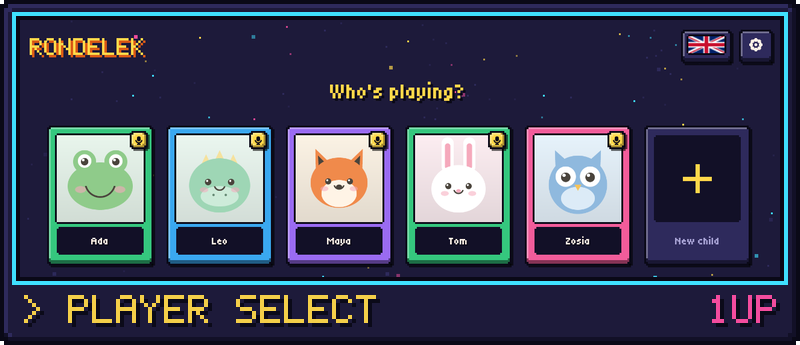
The app picks your computer’s language on its own. If you’d like a different one, the little flag in the top corner opens the language list. There are seven so far: English, Polski, Deutsch, Français, Español, Italiano and Українська.
Making a card for your child
Press New child, type their name, and choose a picture. There are three kinds:
- A cartoon friend. A fox, a frog, an owl, and more, drawn either as bright pixel art or in a softer, classic style. Kids usually love picking one.
- A photo from the webcam. Press Take photo, smile, and capture.
- Any picture you have. Press Upload picture and choose a file (PNG, JPEG or WebP).
Press Create, and your child’s card is ready. You can change the name or the picture any time later, from the little pencil key next to their name.
What’s next
Tap the card, and your child arrives at their own screen with three big tiles: Sounds, Games and Voice calibration.
Before the games, please do the voice calibration together. It’s the one step that really matters, and it only takes a minute or two. Voice calibration shows you how.