The games
The games are Rondelek’s second way to play, and here the child’s voice is the controller. No buttons, no joystick: just say a vowel, and something happens on screen.
The games need the voice calibration, so they know what your child’s vowels sound like. If it isn’t done yet, the Games screen shows a friendly reminder with a key that takes you straight there.
Vowel Runner
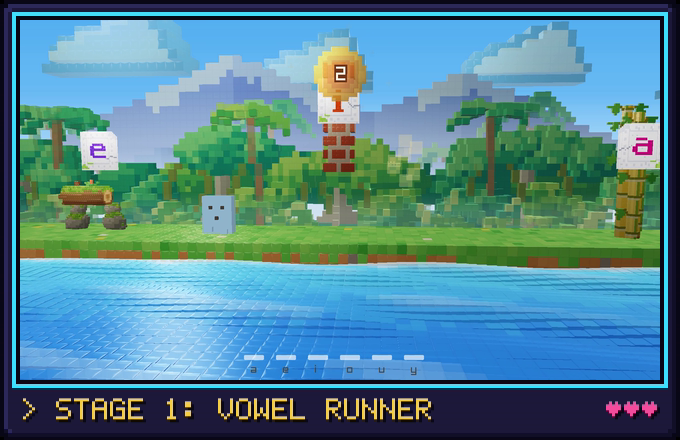
The first game is Vowel Runner. A little blocky hero runs along a meadow by the sea, in front of a thick jungle of trees, big leaves and palms swaying in the wind (glassy at the front, where the sun twinkles now and then) under tall snowy mountains, and things come their way: logs and sleeping tortoises to jump over, fallen trees to duck under, brick walls to knock down with a star, and tall bamboo that needs a double jump. Your child says one vowel to jump (say it again in mid-air for a flying double jump), another to duck, and a third to throw a star.
Every obstacle comes with a little white stone tablet, like a relic from an old jungle temple, the vowel that gets past it carved right in. The tablets listen too: when your child says a tablet’s vowel, it gives a happy hop, and its letter lights up for as long as the sound goes on.
A miss is no drama: the hero just bounces off and keeps running. Every obstacle cleared the way it asks earns a point, and the golden sun at the top spins round like a coin to show the new score. (Leaping over a bar or a wall gets past it, but only ducking under the tree or knocking the wall down with a star counts, so every vowel gets its turn.)
Now and then grassy ledges float by with little golden suns over them. Jump up onto a ledge (right through it from below is fine) and run along it to collect the suns: each one is a point too. The high ledges need the double jump, or a hop up from a low ledge just before them.
When a sound comes out, the sea along the front gets playful too: its waves dance while the child makes noise. The scenery itself stays calm and slow on purpose, so nothing competes with the hero or makes anyone dizzy.
Before each game: the grown-up’s screen
Every game starts on a small setup screen. It has no words at all, just pictures, so it works in any language:
- Which vowel does what. For each move (▲ jump, ▼ duck, ★ throw a star), pick a vowel. Choose sounds your child can say comfortably, or sounds you’d like to practise.
- Which obstacles appear. Switch obstacle kinds on or off. Fewer kinds make an easier, gentler game.
- Reaction (the turtle and the rabbit). Towards the turtle, the game waits a moment to be sure it heard right, and makes fewer mistakes. Towards the rabbit, it reacts at once. The game remembers this for next time, and you’ll find the same setting on the grown-ups page.
Press ▶ to play.
A nice detail: the game then listens only for the vowels you picked. So if, say, e and y sound alike for your child, and you only picked e, the game won’t get confused by a y.
While playing
- Press
Escto end the game. You’re taken straight back to the app. - The keys
A E I O U Yact like saying that vowel. They’re handy for a grown-up trying the game out, or for checking which vowel does what.
While a game is running, Rondelek itself steps quietly aside and hands the microphone over to the game, so nothing gets in the way.
Starting a game on its own
The games also run without the main app. On Windows, double-click
rondelek-game.exe. On Linux, run the AppImage with --game (the menu
entry has a Voice games shortcut, too). The game first asks
who’s playing, showing the same children and pictures as the app, and then
off you go.
More games are coming
Vowel Runner is the first of several. New games plug into the same setup: the same children, the same calibration, the same who’s-playing screen. If you build things, Voice games under the hood shows how a game is made.