The sound board
The sound board is Rondelek’s first way to play, and the one that works right away, even before the voice calibration. Twelve big keys, and every one can hold a sound: a giggle, a growl, a sung “la-la-la”, a dog’s bark, a grandparent saying hello. Record it, tap it, and there it is again.
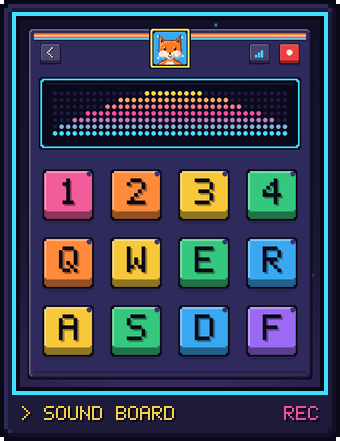
Open it with the Sounds tile on your child’s screen.
Recording a sound
- Press the red REC key at the top right (or the
Spacebar). The board switches to recording mode. - Hold a key and make the sound. It records for as long as you hold it.
- Let go (or press
Esc) to stop.
A little light in the key’s corner shows that it now holds a sound. Recording onto a key that already has one simply replaces it.
Playing the sounds
Press REC (or Space) again to get back to playing, then tap any key
to hear its sound. Tap as often as you like, and try several keys quickly:
the sounds play on top of each other, so a child can make their own little
song out of them.
Each key has a letter on it, matching the keyboard: 1 2 3 4 on the top row, Q W E R in the middle and A S D F at the bottom. So the sound board works with the mouse or the keyboard, whichever your child likes best.
The little screen
Above the keys is a small glowing screen. The square key just left of REC changes what it shows:
- Sound bars: little bars that dance along with every sound, whether it’s your child’s voice or a key playing back.
- Vowels: a big letter showing which vowel the app hears, with a meter for each of the six. This one needs the voice calibration, and it’s a lovely way to check that the calibration worked.
- Off: a calm, dark screen.
Everything is kept
You never need to save. Every recording is kept straight away, and the next time your child opens Sounds, their board is exactly as they left it.
Each set of twelve recordings is called a session. Now and then it’s nice to start fresh, say on a new day or for a new game idea. On your child’s screen, Start with empty pads begins a new, empty session. The old one isn’t gone: grown-ups can open any earlier session again from the grown-ups page.
To leave the sound board, press the back key at the top left.